
Creating a registration form is one of the first steps in your event organisation. Forms allow you to collect the information you need to plan, organise and manage registration for your event’s attendees.
An effective event registration form template is therefore paramount to organising a successful event, and creating one requires special attention from event organisers, as the quality of your registration form impacts the quality of your event. A clear and well-structured event registration form is crucial for maximising conversion rates and ensuring attendees complete their registration.
Below, we have put together some valuable tips to guide you through the event registration process and help you create the perfect online registration form to capture the attendee data you need for your event.
Summary
1. Choosing your online registration solution.
Firstly, you need a tool to create your online registration form. Ideal for event planning, event registration software not only helps you create and control your form’s input fields, but allows you to sell tickets and manage attendee registration in the process.
Be sure to check the capabilities of each tool beforehand, as your chosen registration solution should allow for full customisation of your registration page and form to match your event branding, including layout, fonts, colours, and images. Your registration form should be mobile-friendly and fully responsive on all mobile devices, ensuring a seamless experience for every attendee. This is essential, as over 90% of UK adults use smartphones. On top of this, make sure the creation process is quick and easy, and does not require expert IT skills.
All information collected through the form must only be used by you for your event; your chosen event registration software must prioritise data safety, always adhering to UK data privacy laws and regulations.
2. Customise your event registration form.
A customised event registration form is a successful event registration form. You should always take into consideration the type of attendee you’re trying to attract to your event in order to customise your registration form accordingly. For example, you would not ask the same information of festival-goers as you would workshop or conference attendees. Try to put yourself in your audience’s shoes; what information would they be willing to share with an organisation that they trust?
You should expect varied responses to your online form, and as such be able to cater for multiple answer types. In order to collect attendee information effectively, make sure that your event registration tool of choice offers all of the following options: text field, comment field, drop-down, attachments, date, check boxes, and country/location. On top of this, ensure your tool allows you to create custom fields. Custom questions can be used to gather specific information, such as food allergies, food preferences, seating preferences, or accessibility needs. Collecting this information helps create a more inclusive event experience and ensures you can accommodate all attendees. Additionally, collecting details about attendees’ companies or organisations can help event planners better understand their audience.
Customising your event registration form starts with the visuals. The essence of the event must be reflected in the visual aspect of the form. You should, of course, be careful not to go overboard with customisation, as this can look amateurish and off-putting, but a tasteful adjustment of the colours – the background, buttons, or text – to align with your branding can really reinforce credibility. A little goes a long way when it comes to designing a professional-looking event registration form.
3. Cover key information
The main purpose of your event registration form is to allow attendees to register for your event, so it must present essential information clearly and concisely. The name of the event, date, and location are absolutely vital, along with a short description for any other key event details. Feel free to insert a Google Maps link to further help people locate your event.
Don’t skip the small stuff, as a clearly designed registration form suggests a well-organised event.
4. Only ask the right questions.
Research shows that minimising the number of form fields in your event registration form significantly improves conversion rates.
When you first start organising an event, it is tempting to try to collect as much information as possible about your attendees; this is even more appealing if you are planning future events on top of this one. Though these seem like valuable insights, this is not best practice. All the attendee data you collect in your registration form should be relevant and appropriate.
Too many fields create friction, and friction creates doubt. Every additional question increases the risk of losing attendees, as asking for too much information increases the chance of drop-off before registration is completed. Think about what you really need to know in order to carry out your event, and keep your registration form brief. Here’s an example:
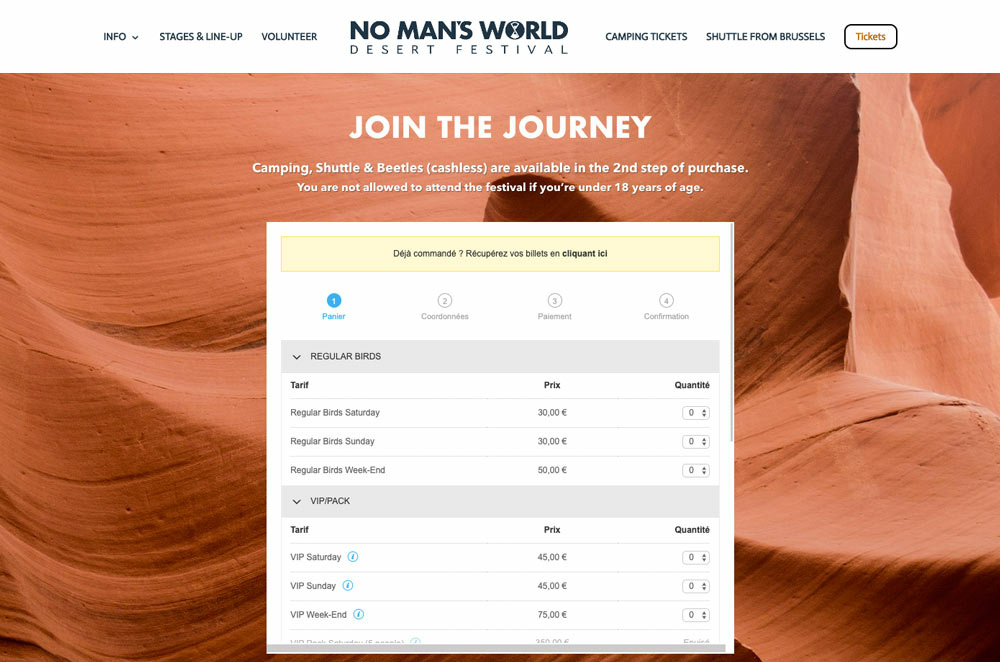
No Man’s World Desert Festival designed a short event registration form, asking for only what was strictly necessary of their attendees, including important details such as the country code within the phone number field and the option to receive an invoice.
4. Simplify access to the registration form.
The simplicity of the registration process depends primarily on your chosen online solution. To simplify the registration process, it must enable you to easily share registration links with guests. You can share it via email, newsletters, your website or social media…whatever your chosen channel the selected participants should have easy access to the event’s registration form.
To allow them to use your services even more easily, you can pre-fill a few boxes of the registration form for them using the information you already know about them. It may relate to their identity, location, etc. This will greatly simplify registration, thereby encouraging even more participants to take the plunge!
5. Simplify the journey.
The simplicity of your event registration process depends on your chosen event registration software. To streamline the journey, your tool must allow you to easily share your registration form links with guests. Use various channels, such as email, newsletters, your website, or social media, to reach attendees and drive them to the registration page. For the best user experience, event registration forms should be simple, intuitive, and mobile-friendly, with a single-column layout to improve usability on mobile devices.
To give your attendees a head start and encourage form completion, you should pre-fill a few fields within the event registration template for them, using the information you already have on record – their identity or location, for example. This massively speeds up completion, removes hesitation, and leads to more attendees taking the plunge on your event!
6. Speed is the name of the game.
Whether it’s your first event or one of many, emphasis should be placed on the speed of the registration process. There are several actions you can take to encourage faster registration, including always specifying the total number of remaining tickets available. This introduces urgency, showing potential attendees that the event is popular and therefore likely to see a high number of registrations. The fewer tickets remain, the faster attendees will register to guarantee their place.
Fundamental to event registration speed is how long the registration actually takes to complete. You should ensure your event registration tool has an intuitive interface for easy navigation and offers high page speed performance, as slow load times can have a detrimental effect on registration form completion rates. Incorporating real-time field validation can also provide users with immediate feedback on errors in required fields, speeding up error resolution and reducing the likelihood of frustration and drop-off during registration.
Furthermore, you should always specify the remaining number of sections or pages; that way, the person filling out the form knows how much time they will need to complete it. You should also give a clear indication of the time it takes to fill out the form, whether that be prior to registration or within the event registration form template. If relevant, include a field for membership of clubs or associations, as this can help tailor the event experience, enable member-specific pricing, and streamline on-site coordination.
7. Include suggested answers.
Filling out a registration form can be a tedious experience. Do not hesitate to include drop-down lists containing suggested answers to streamline the process. This way, if your event registration form does include a lot of necessary questions, the attendee won’t have to manually enter each answer.
Your event registration software of choice should also allow you to send automated confirmation emails to your attendees and participants, letting them know that their registration form submission was successful.
8. Event logistics considerations.
Effective event management starts with gathering the right attendee data through your online registration form. By including fields for attendee names, contact details, and dietary restrictions, you equip your team with the essential details needed for smooth event planning and logistics. Collecting this information upfront allows you to anticipate attendee needs, from meal preferences to seating arrangements, ensuring a personalised and enjoyable experience for everyone.
Including logistics-related fields, such as seating preferences, accessibility needs, or special requests, within your registration form template reduces the risk of errors and last-minute surprises. It also streamlines communication between event organisers and vendors, supporting efficient event management from start to finish.
By leveraging your online registration form for comprehensive data collection, you can make data-driven decisions, enhance attendee satisfaction, and ultimately drive higher ticket sales. A thoughtful approach to event logistics not only improves the attendee experience but also contributes to the overall success of your event, setting the stage for even more successful future events.
Try it out!
Ultimately, these quick tips can help you create the perfect online event registration form template – no matter your needs.
If you’re looking for an event registration tool that offers full customisation capabilities as well as detailed attendee management, look no further. Put these tips to the test with Weezevent’s online registration tool by clicking the button below:
